

Pre-Closure Checks - Outstanding Case Actions
Before a case is closed, any outstanding case actions must be resolved.
Any Case Action without a Purple Tick is outstanding.
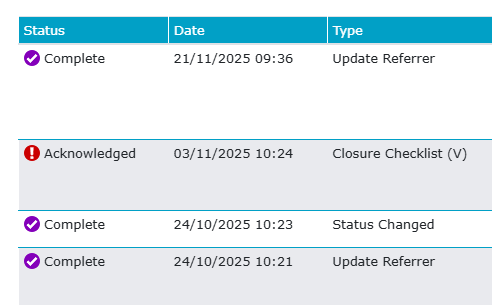
In the above example, the Closure Checklist must be resolved before this case is closed. In most cases, this will require either completing or abandoning the case action.
The most commonly incomplete case action is the Safe Lives Assessment, because there should always be one open on all Victim cases, and it must be completed or abandoned before the case is closed.
Even if you complete the SLA at closure, the system will still automatically add a follow-up, which you will always need to abandon because it’s part of the system automation.
To complete the other case actions, you need to process them as you would normally. For example, above, open the case action, start/continue assessment, update the fields and complete the assessment/checklist.
Once all case actions are purple ticks, either complete or abandoned, then you can continue to close the case.
Suppose you do not resolve these issues before you close the case. In that case, if you look at the My Case Actions screen, you will find that case actions for closed cases continue to be shown, and this will prevent you from using this screen effectively, because you will not be able to find the case actions for active clients so easily.
In order to resolve these actions, you’ll need to follow the steps here, so that they are removed.